Zapier is a candidate when you need one app event to cause an action in another. Before choosing a subscription, specify the exact trigger, destination action, permissions and result you will accept. An app appearing in an integration directory does not establish that your required operation is supported by your account.
Review scope, October 8, 2026: This is a documentation-based buying and operating checklist. We have not run a controlled Zapier benchmark. We removed the previous star rating, fixed prices, integration counts, claims of being tested and unconditional comparisons with Make, n8n and Pabbly.
Link disclosure: Zapier links on this page are ordinary vendor links. We have not verified a Zapier affiliate relationship for this project. Related buying guides may contain separately disclosed affiliate links.
Define one workflow before comparing platforms
Start with a small, reversible internal task. For example, copy a non-sensitive sample request into a test project record. This is a proposed evaluation, not an automation we have deployed or a measured saving.
Write the source event, destination fields, intended owner and conditions under which the workflow should stop. Keep public posting, client messages, payments and destructive actions outside the sample until their approval and recovery requirements are clear.
| Requirement | Evidence to collect |
|---|---|
| Trigger | Exact app event, available fields and timing requirements |
| Action | Supported operation and the destination record it should produce |
| Access | Account owner, required permissions and who can reconnect it |
| Mapping | Expected values, missing fields and validation rules |
| Duplicate handling | A stable source reference and a check for an existing destination result |
| Recovery | Named operator, failure notification and review before replay |
| Handoff | Client access to settings, records, logs and billing responsibility |
Use non-sensitive sample data and keep credentials out of shared notes. A successful editor test is a starting check; it does not establish long-term reliability or all edge cases.
Count the work that is actually billed
Zapier’s task-usage documentation , checked October 8, defines tasks around successful actions. Triggers, including polling checks, do not consume tasks. Filter and Paths steps are also excluded. Other products and step types can have different rates, so counting boxes in a workflow is not a complete budget.
For a hypothetical workflow with two ordinary billable actions, 100 events that each complete both actions would use 200 tasks. That calculation assumes both actions count under the current rules and no additional billable work occurs. It is not measured account usage or a vendor quote.
Build your own estimate from event volume, eligible actions, branches and expected recovery work. Compare it with the actual usage counter after a bounded sample. Keep AI/model charges, connected-app subscriptions and any separate usage allowances on their own lines.
Inspect the commitment before checkout
Use Zapier’s current pricing page and your account’s plan details to record the billing term, amount due now, renewal and usage limits. We do not keep a fixed price table here because the selected task tier and required features matter to the final commitment.
Ask what happens when your allowance is exhausted, whether additional billing is enabled and who can approve a change. Do not assume continued operation is free or that every workflow simply stops without further charges. Keep the documented behavior with your decision.
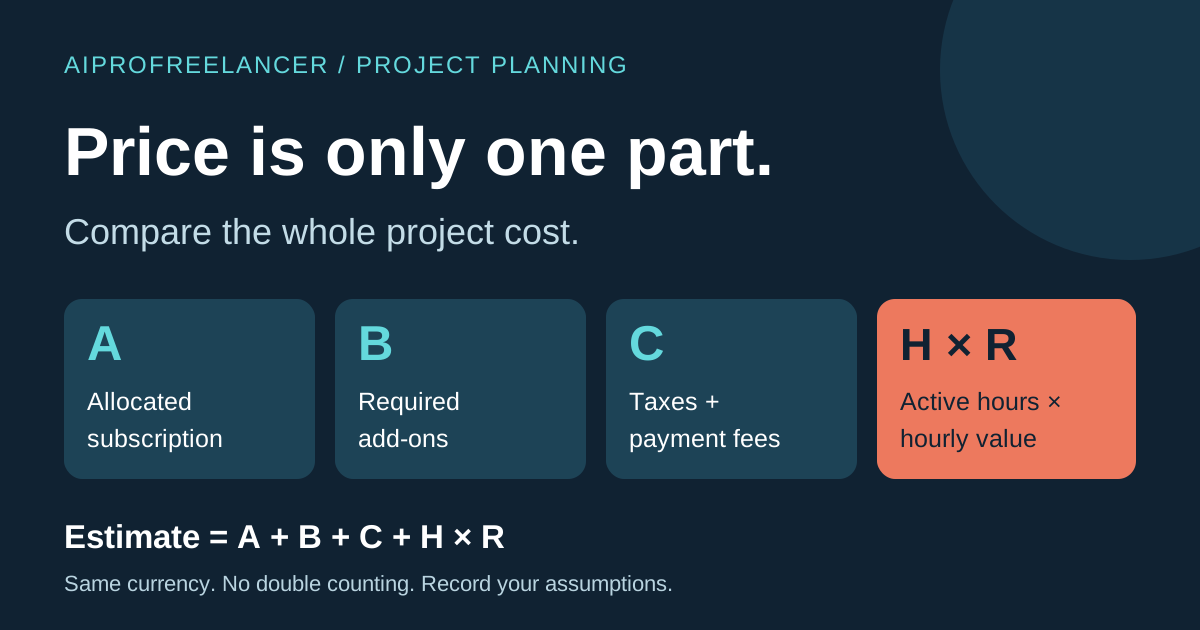
Use the whole-project cost worksheet to include setup, checking, maintenance and client handoff. Our project-cost guide distinguishes cash due now from the share allocated to one project.
Recovery is a workflow decision
Zapier’s replay guide distinguishes replaying errored steps from replaying an entire run. It also describes plan-dependent manual and automatic options and explicitly does not guarantee that a replay succeeds. Full-run replay can repeat earlier successful work; task accounting includes successful steps that run again.
Before a replay, inspect the destination result and source reference. Record whether an earlier action already created a record or sent something. Choose the recovery route only after you understand which steps it will execute. Do not treat an error label as proof that every destination action failed.
A useful rehearsal includes a missing required field, an expired connection and a duplicate sample event. Keep expected and observed outcomes separate. Record what the operator had to do and whether the final destination state was correct. We have not performed that rehearsal for this review.
Compare the same outcome with alternatives
For Make, n8n, Pabbly or a local executor, compare the same source, destination and acceptance requirements. Record each product’s billing unit separately; an operation, task, execution and model token are not interchangeable.
If you consider self-hosting, include the server, updates, access recovery, monitoring and operator time rather than assuming free operation. If you consider a hosted platform, verify the exact integration and support scope rather than relying on directory size. This article does not establish a cheapest or easiest platform.
Decide whether the sample supports rollout
Proceed only when the required fields, permissions, cost and recovery behavior are documented enough for the intended workload. Retain the sample record, observation date and unresolved questions. A workflow that still needs manual repair is not evidence of an unattended operating model.
For a freelancer, the final acceptance question is practical: can the receiving owner understand the workflow, inspect the result, handle a failure and control spending? Use the AI tools task directory for related client-workflow guides. Leave product rankings and claimed time savings unmeasured until comparable observations exist.