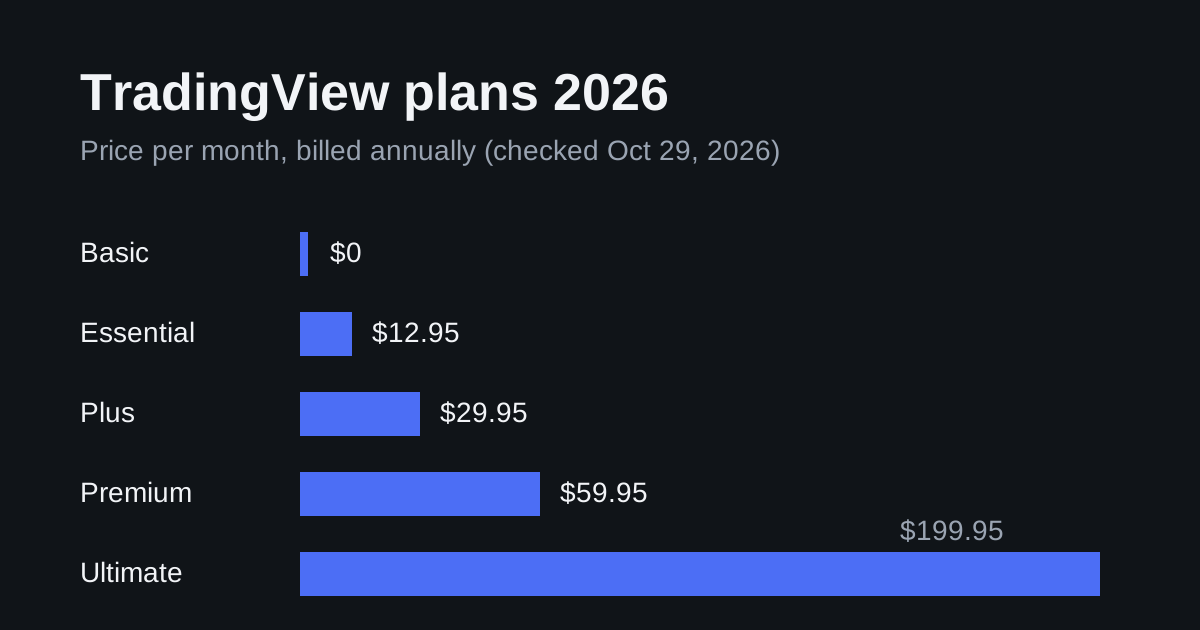
Short answer: you need a paid TradingView plan (Essential or higher), two-factor authentication on your TradingView account, and an always-on server that answers HTTPS on port 443 within 3 seconds. A small Linux VPS covers the server side for under $10 a month; the TradingView plan is the bigger cost.
See TradingView plans (new subscribers get a $15 discount through this link) · Compare Hostinger VPS plans
Affiliate disclosure: links marked above are referral links. We may earn a commission if you buy, at no extra cost to you. Read our disclosure .
TradingView rules below come from the official webhook help article and pricing page , checked October 29, 2026. VPS prices come from our VPS price index . This guide covers plumbing, not trading strategy or results.
How a TradingView webhook works
When an alert fires, TradingView sends an HTTP POST request to a URL you entered in the alert. The body of the request is the alert message. If the message is valid JSON, TradingView sends it with an application/json content type; otherwise it is sent as text/plain.
Your server receives that request and does something with it: logs it, forwards it to Telegram, or calls your broker’s or exchange’s API. TradingView does not place the order for you through the webhook; your code does.
TradingView’s rules your server must meet
| Rule | What it means for your setup |
|---|---|
| Paid plan required | Webhook notifications start at Essential; Basic (free) has none. See our plan comparison . |
| 2FA required | Webhook alerts are only allowed when two-factor authentication is enabled on your TradingView account. |
| Ports 80 and 443 only | A URL like http://1.2.3.4:5000/hook is rejected. Put a web server or reverse proxy on 443. |
| 3-second timeout | If your server takes longer than 3 seconds, TradingView cancels the request. Reply first, do slow work after. |
| No IPv6 | Your domain needs an IPv4 (A) record. |
| Fixed sender IPs | TradingView sends from 52.89.214.238, 34.212.75.30, 54.218.53.128 and 52.32.178.7, so you can allowlist them in your firewall. |
| Delivery can fail | Check the “Webhook status” column in the alert log; design the bot so a missed or duplicate alert does not cause damage. |
Which VPS is enough?
A webhook receiver is light. It waits for a few requests a day and answers in milliseconds. Memory matters only if the same server also runs a backtest, a database or a full trading bot.
| Plan (Linux) | RAM | First term, per month | Renewal, per month | Fits |
|---|---|---|---|---|
| UltaHost VPS Basic | 1 GB | $5.52 | $5.52 | Receiver + small script |
| Hostinger KVM 1 | 4 GB | $6.49 (24-month term) | $11.99 | Receiver + bot + logs |
| UltaHost VPS Business | 2 GB | $9.78 | $9.78 | Receiver + bot |
| Hostinger KVM 2 | 8 GB | $8.79 (24-month term) | $14.99 | Several bots or a database |
Prices checked October 29, 2026; the first-term price requires paying the whole term up front. Use the VPS cost calculator to see the day-one invoice and the renewal.
Compare Hostinger VPS plans · See UltaHost VPS plans
Setup in six steps
1. Turn on 2FA and pick a plan
Enable two-factor authentication in your TradingView account settings, then subscribe to Essential or higher. Without both, the webhook option is not available.
2. Point a domain at the VPS
Create an A record such as bot.example.com pointing to the VPS’s IPv4 address. A domain lets you get a free TLS certificate so the alert travels over HTTPS.
3. Put HTTPS on port 443
Caddy gets and renews a certificate automatically. A two-line Caddyfile forwards public HTTPS traffic to your app on a local port:
4. Run a minimal receiver
TradingView cannot add custom headers, so put a shared secret inside the alert message and check it on the server. This Flask example answers immediately and leaves the slow work to a queue:
import json, os, queue, threading
from flask import Flask, request, abort

SECRET = os.environ["HOOK_SECRET"]
jobs = queue.Queue()
app = Flask(__name__)

@app.post("/hook")
def hook():
    data = request.get_json(silent=True) or {}
    if data.get("secret") != SECRET:
        abort(403)
    jobs.put(data)          # reply fast; TradingView gives up after 3 s
    return "", 204

def worker():
    while True:
        alert = jobs.get()
        # Call your broker/exchange API or send a notification here.
        print("alert", json.dumps({k: v for k, v in alert.items() if k != "secret"}))

threading.Thread(target=worker, daemon=True).start()
app.run(host="127.0.0.1", port=8000)
Run it as a service (systemd or a process manager) so it restarts after a reboot.
5. Write the alert message as JSON
In the TradingView alert dialog, set the webhook URL to https://bot.example.com/hook and the message to JSON, for example:
{"secret": "long-random-string", "symbol": "{{ticker}}", "price": "{{close}}", "action": "buy"}
{{ticker}} and {{close}} are TradingView placeholders filled in when the alert fires. Do not put exchange API keys or passwords in the message; TradingView’s own guidance warns against sending credentials in the webhook body.
6. Lock down and test
- Allow inbound 443 only from TradingView’s four IPs (plus your own IP for SSH).
- Fire a test alert and confirm the “Webhook status” in TradingView’s alert log and the line in your server log.
- Make the order logic idempotent: if the same alert arrives twice, the bot should not open two positions.
Monthly cost
| Item | Low end | Notes |
|---|---|---|
| TradingView Essential | $12.95 (annual) / $14.95 (monthly) | Required for webhooks |
| Linux VPS | $5.52–$9.78 | First-term price; check renewal |
| Domain | ~$1 | Optional if you already own one |
| Total | about $20–$26 per month | Before taxes |
If you only need notifications on your phone, TradingView’s own push and email alerts work on every plan, and you do not need a VPS at all.
FAQ
Can I use the free TradingView plan for webhooks?
No. Webhook notifications start at Essential, and two-factor authentication must be on.
Why does TradingView reject my webhook URL?
The most common causes are a port other than 80 or 443, an IPv6-only address, or a server that takes more than 3 seconds to answer.
Do I need Windows?
No. A webhook receiver runs on Linux. You need Windows only if the same machine also runs MetaTrader; see our forex VPS guide .
How do I stop strangers from triggering my bot?
Check a long random secret in the message, allow only TradingView’s IP addresses on port 443, and never let the webhook alone move funds without limits in your own code.
Is a bigger VPS faster for alerts?
Not in a way that matters. The alert’s delay is mostly TradingView’s processing and network time; a 1–4 GB VPS answers a webhook in milliseconds. See running trading bots on a VPS for heavier workloads.