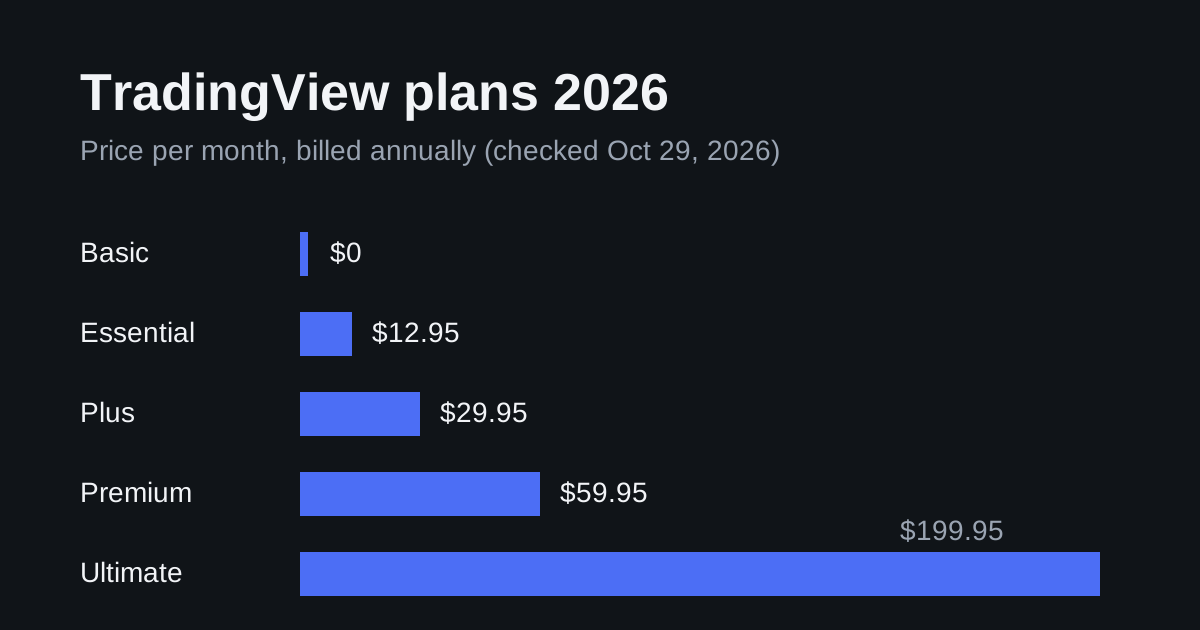
Best for a focused chart-and-alert workflow: Essential. Stay on free Basic while learning; choose Plus for combined conditions and Premium when larger layouts or alert capacity earn their keep.
Compare TradingView plans and choose your tier
Affiliate disclosure: some links are affiliate links. We may earn a commission if you subscribe through them, at no extra cost to you. Read our disclosure .
Black Friday 2026: TradingView’s official sale page shows a launch countdown, with no discount published yet. See the live status and 12/24/36 month cost totals , updated November 20, 2026.
Based on official pricing and documentation checked November 5, 2026. These are software recommendations, not investment advice.
The best purchase is the cheapest plan that supports your actual routine. Before upgrading, write down the chart layout, indicators and alerts you use together. A higher subscription buys capacity and tools; it does not make a trading strategy profitable.
TradingView prices and what each tier unlocks
| Plan | USD per month on annual billing | Annual charge, calculated as monthly equivalent x 12 | Charts per tab / indicators per chart | Price alerts / technical alerts | Best fit |
|---|---|---|---|---|---|
| Basic | Free | $0 | 1 / 2 | 3 / 0 | Learning and occasional chart checks |
| Essential | $12.95 | $155.40 | 2 / 5 | 20 / 20 | Focused charting and indicator alerts |
| Plus | $29.95 | $359.40 | 4 / 10 | 100 / 100 | More simultaneous markets and combined conditions |
| Premium | $59.95 | $719.40 | 8 / 25 | 400 / 400 | Larger workspaces and heavier alert use |
Source for prices and limits: TradingView pricing and plan comparison , checked November 5, 2026. USD figures refer to the official page’s dollar pricing; the page also localizes currency. Annual amounts above are calculations, not separate monthly payment offers. Taxes, exchange data and account-specific promotions can change your total.
Basic is the ongoing free option. For paid trials, check the offer shown to your account, its conversion price and cancellation deadline before entering payment details. An annual monthly equivalent means an annual commitment, so compare the total charge with the monthly option before deciding.
Our buying rule: start monthly if you still need to validate your workflow, then consider annual billing once you know which limit matters. A discounted higher tier is poor value if you would otherwise use the free plan. For seasonal offers, keep our TradingView Black Friday 2026 guide handy rather than assuming a future discount is guaranteed.
Who should choose each plan, and who should not?
Basic: stay free while your routine is simple
Choose Basic if you mostly inspect a chart, mark levels and return later. Use the free version to work out whether you prefer TradingView’s layout to your broker’s own charts. Keep a short note whenever a restriction interrupts something you genuinely need to do.
Do not pay simply to remove the feeling that you are missing a professional tool. If you cannot name the task a paid feature would unlock, keep learning on Basic. Its small workspace and limited alert allowance become drawbacks when your routine depends on several simultaneous signals, rather than occasional visual checks.
Essential: the first paid tier to consider
Choose Essential when a focused workspace is enough but free-plan restrictions interrupt your analysis. For a trader following a small shortlist of instruments, it is our starting recommendation because it avoids buying capacity before there is a use for it.
Do not choose it if your requirement is specifically the native multi-condition alert builder. That feature starts with Plus. Count technical alerts separately from price alerts: spare price-alert capacity does not solve a shortage of indicator-alert slots. Keep room for temporary setups so that replacing an old alert does not become a daily housekeeping task.
Plus: buy it for a specific workflow
Choose Plus when you want to see several markets together or build alerts that require multiple conditions to agree. For example, you might want a trend filter and a momentum condition to be true together before receiving a notification.
TradingView’s multi-condition alert documentation , checked November 5, 2026, confirms availability from Plus upward and says strategies and scripts using the alert() function are unsupported in this builder. Each combined alert counts as one technical alert.
That distinction matters if you are buying for an existing script. Open its alert dialog first and confirm compatibility. Do not assume that paying for Plus will combine every third-party script you already own. Stay with Essential if extra layout space and combined conditions would sit unused.
Premium: justify it with a larger working set
Choose Premium when you regularly need a wider workspace or run enough active setups that Plus becomes restrictive. Our recommendation is to inventory the alerts and layouts you actually maintain before committing. Separate active trading requirements from experimental indicators you rarely consult.
Do not buy Premium merely because it is the most prominent upgrade. If your bottleneck is understanding an indicator or deciding which signals to trade, more capacity will add clutter. Also inspect the alert expiration control for your account before buying specifically for long-running alerts; the setting needs to match your maintenance routine.
TradingView also lists Ultimate above these tiers. If a feature outside this comparison is essential, inspect that tier directly instead of assuming Premium includes every platform capability. Check professional-user eligibility in the plan selector if it applies to your account.
See TradingView plans for your chart and alert requirements
Budget for market data and webhook delivery separately
A platform subscription and an exchange data subscription solve different problems. TradingView explains that many stock and futures exchanges charge separately for real-time quotes in its additional market data guide , checked November 5, 2026. Check the exchange and symbol you will actually use before choosing a software tier.
For webhooks, a notification is a message sent to an external application. It is not a complete trading system. TradingView’s webhook configuration documentation , checked November 5, 2026, requires two-factor authentication and explains the outgoing POST request. Validate delivery with a harmless receiver before connecting anything that can place orders.
Our TradingView webhook setup guide covers the receiving side. Add receiver hosting, any connector subscription and market data to your software budget. A cheap charting tier can still produce an expensive overall setup if you overlook those separate services.
TradingView vs MetaTrader 5: choose by the job
Prefer TradingView when your buying decision centers on its chart workspace and alert workflow. Prefer MetaTrader 5 when your central requirement is an existing Expert Advisor built for that terminal. MetaQuotes documents those programs in its MetaTrader 5 Expert Advisor guide , checked November 5, 2026. A TradingView subscription is not a replacement runtime for that code.
If your broker’s existing tools already cover your analysis and execution, try to identify a concrete benefit before adding another subscription. For forex-specific context, read TradingView for forex traders: charts, alerts and the MT4/MT5 workflow .
If you need an always-on terminal or a webhook receiver, our forex VPS guide explains the hosting decision. Use the VPS cost calculator to budget that separately. Buy hosting for a defined application rather than adding it automatically to every TradingView plan.
How to test it yourself in 15 minutes
This is a suggested evaluation exercise, not a report of measured results.
- Minutes 0-3: open your usual symbol on Basic. Rebuild the chart you use for real decisions, including your preferred timeframe and indicators. Record the first restriction you encounter.
- Minutes 3-6: list the markets you follow simultaneously. Sketch the layout you would actually keep open and decide whether a bigger workspace would change your routine.
- Minutes 6-9: write down the alerts you need. Separate price thresholds, indicator conditions and combined conditions. Check the exact script’s available alert choices rather than assuming compatibility.
- Minutes 9-12: inspect the symbol’s data status. Identify the exchange and whether the displayed feed meets your needs. If evaluating webhooks on an eligible account, use a notification-only destination and keep order execution disconnected.
- Minutes 12-15: compare the lowest suitable tier, billing commitment and separate service costs. If you use a trial, record the renewal amount and cancellation deadline. Leave without paying if no restriction justifies the purchase.
FAQ
Is TradingView free enough for beginners?
Start with Basic while learning the interface and building a repeatable routine. Upgrade when you can point to a specific restriction that blocks your normal analysis, rather than treating a paid plan as a prerequisite for learning.
Is Essential or Plus better value?
Essential is our default paid recommendation for a focused setup. Plus is the better choice when combined-condition alerts or a larger simultaneous workspace are requirements. Verify script compatibility before buying for the combined-condition builder.
When is Premium worth paying for?
When your active workspace or alert inventory exceeds what Plus supports. Build an inventory first. If most saved alerts are abandoned experiments, tidying them may be more valuable than upgrading.
Does a paid plan include all real-time exchange data?
No. Exchange subscriptions can be separate. Inspect your symbol’s data status and the relevant exchange subscription before deciding the total cost; buying a higher charting tier alone does not settle every data requirement.
Can TradingView replace MT4 or MT5?
It can be your preferred analysis workspace, but an existing MetaTrader Expert Advisor still needs its intended platform. Decide whether you are buying charting, alerts or a runtime for trading code before comparing subscriptions.
Do I need a VPS for TradingView?
Budget for a VPS only when your own receiver or terminal needs hosting. If you only use the chart interface and notifications, identify an actual hosted application before adding another recurring bill.